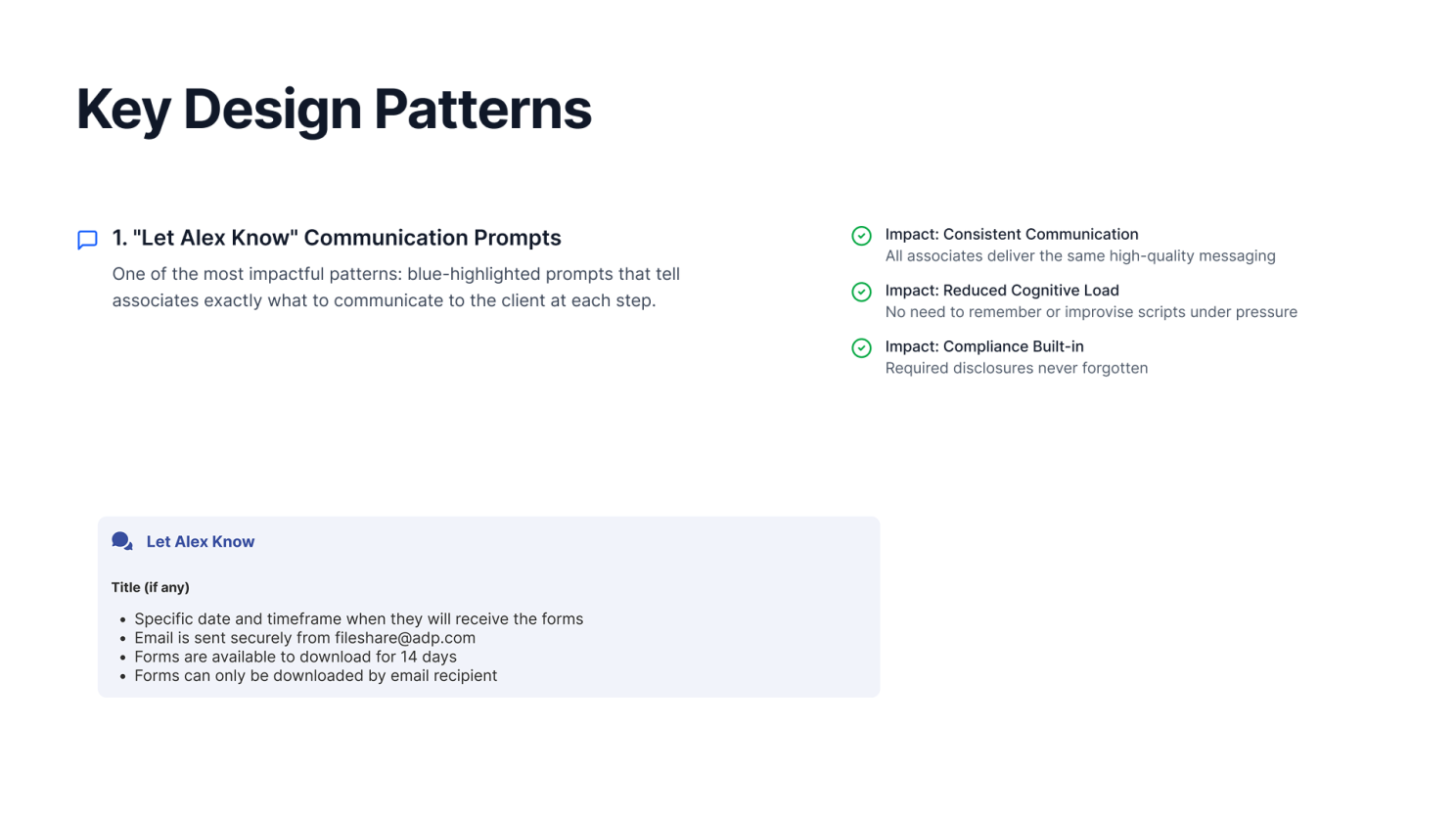
Enterprise UX Salesforce CRM SLDS Decision-Support Design Payroll Tax

Tax Notice
Guided Flow

On a live call, an associate navigated three systems, consulted mental checklists, and made a judgment call with inconsistent results. This project replaced that judgment call with a structured decision.
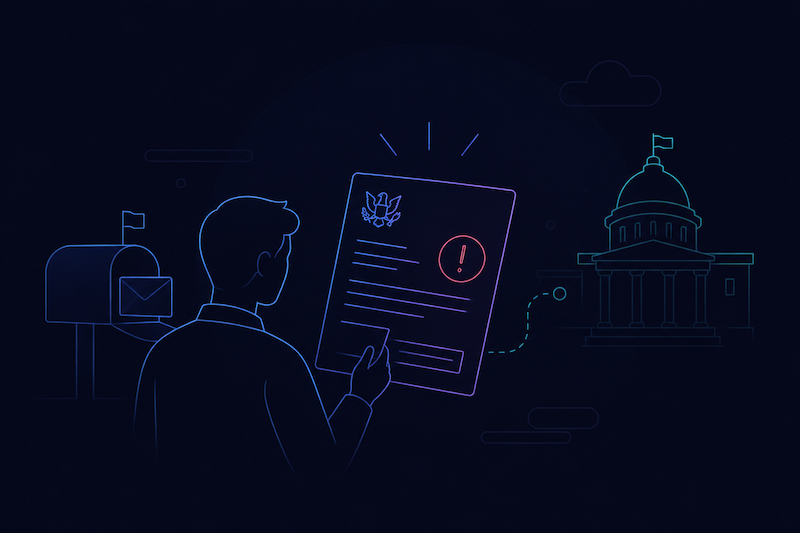
Client ADP
Timeline Dec 2025 – Feb 2026
My Role Lead Product Design
Platform Salesforce Service Cloud
Tax Notice cover
Concept-to-Production
10 WEEKS
Resolution Delay Targeted
10–20 Days
Validation Gates Designed
8
Notice Types Covered
3

01 — Context & Background

High-stakes calls, fragmented tools

ADP associates support hundreds of thousands of business clients on payroll tax. When those clients receive tax agency notices from the IRS, state agencies, or unemployment bureaus, they call ADP expecting clarity, not more confusion.


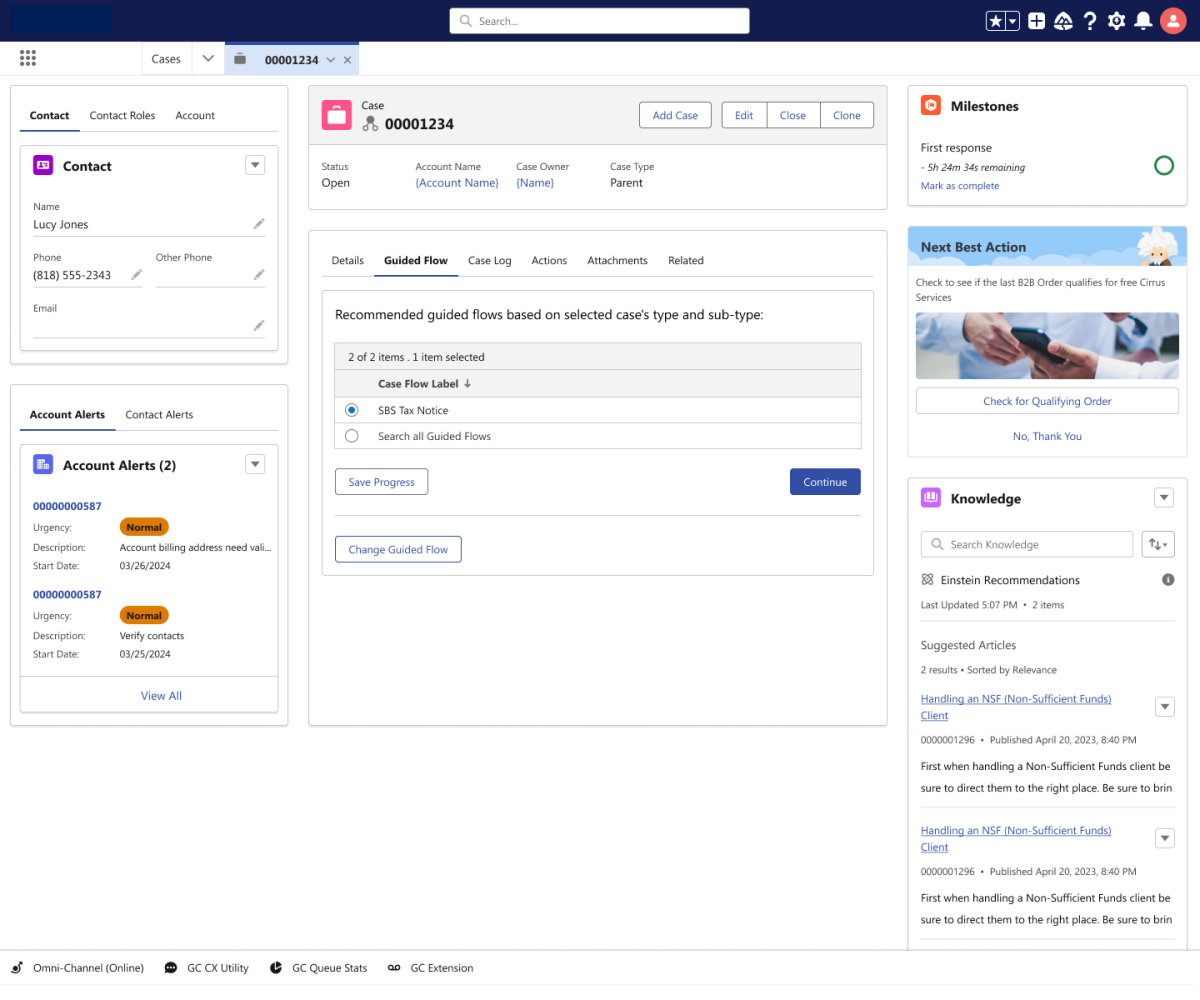
An enterprise support platform, built on Salesforce CRM. It's where associates live during every client interaction. The guided flow needed to embed within this platform. Associates are on live calls under time pressure. Every extra click, every system switch, every ambiguous decision costs the client.


The scale is significant. ADP manages payroll tax for over 300,000 small business clients with state and local jurisdictions. A tax notice can mean anything from a missed deposit, to a rate change, to a legal name mismatch, and the associate on the call often has seconds, not minutes, to classify which one.

Project Dimension
Detail
Platform
Enterprise support platform on Salesforce CRM
Primary Users
Service associates handling live client tax notice calls
Notice Types
Tax notice escalations, SUI rate changes, deposit frequency changes
Business Goal
Reduce unnecessary escalations, shrink resolution delays, improve case completeness
Design Challenge
Guide associates through notice validation and route only qualified cases to research teams
My Role
UX Strategist : workflow analysis, IA, guided flow design, interaction design, stakeholder alignment

02 — The Problem to Solve

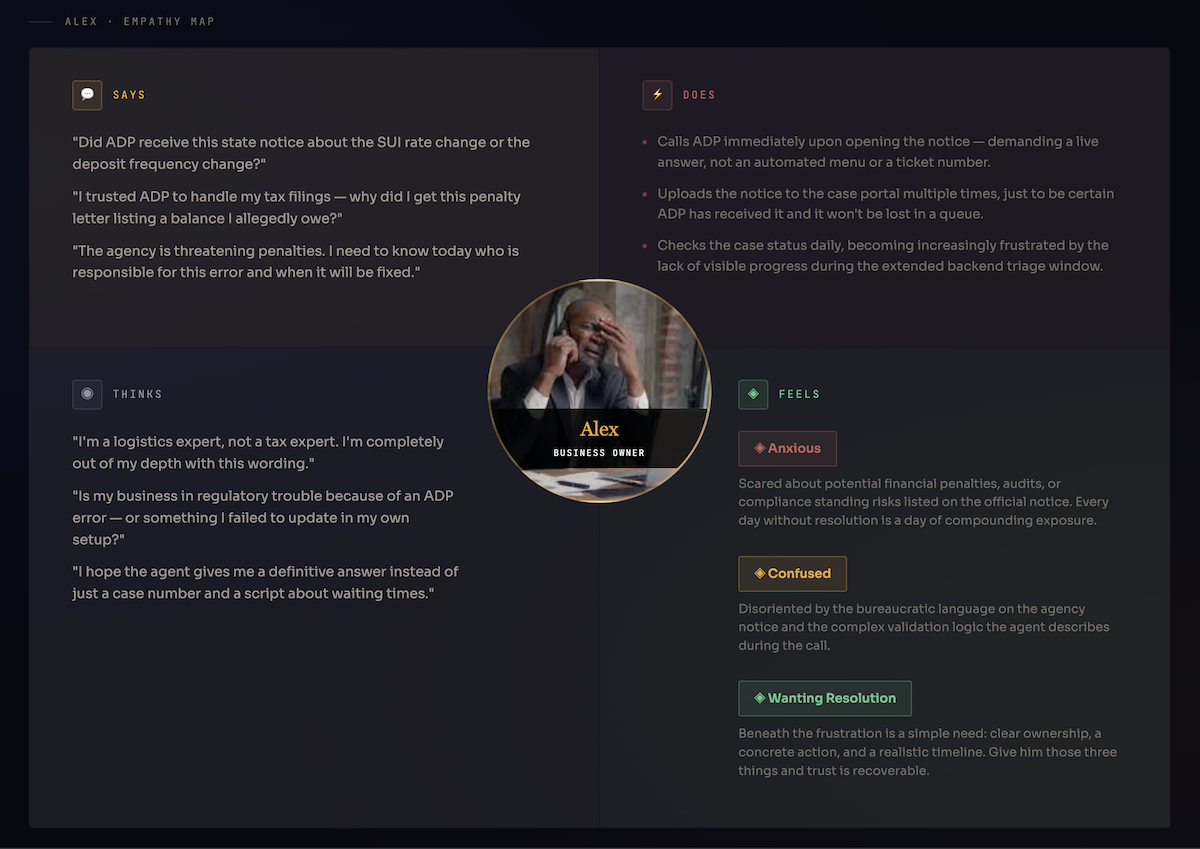
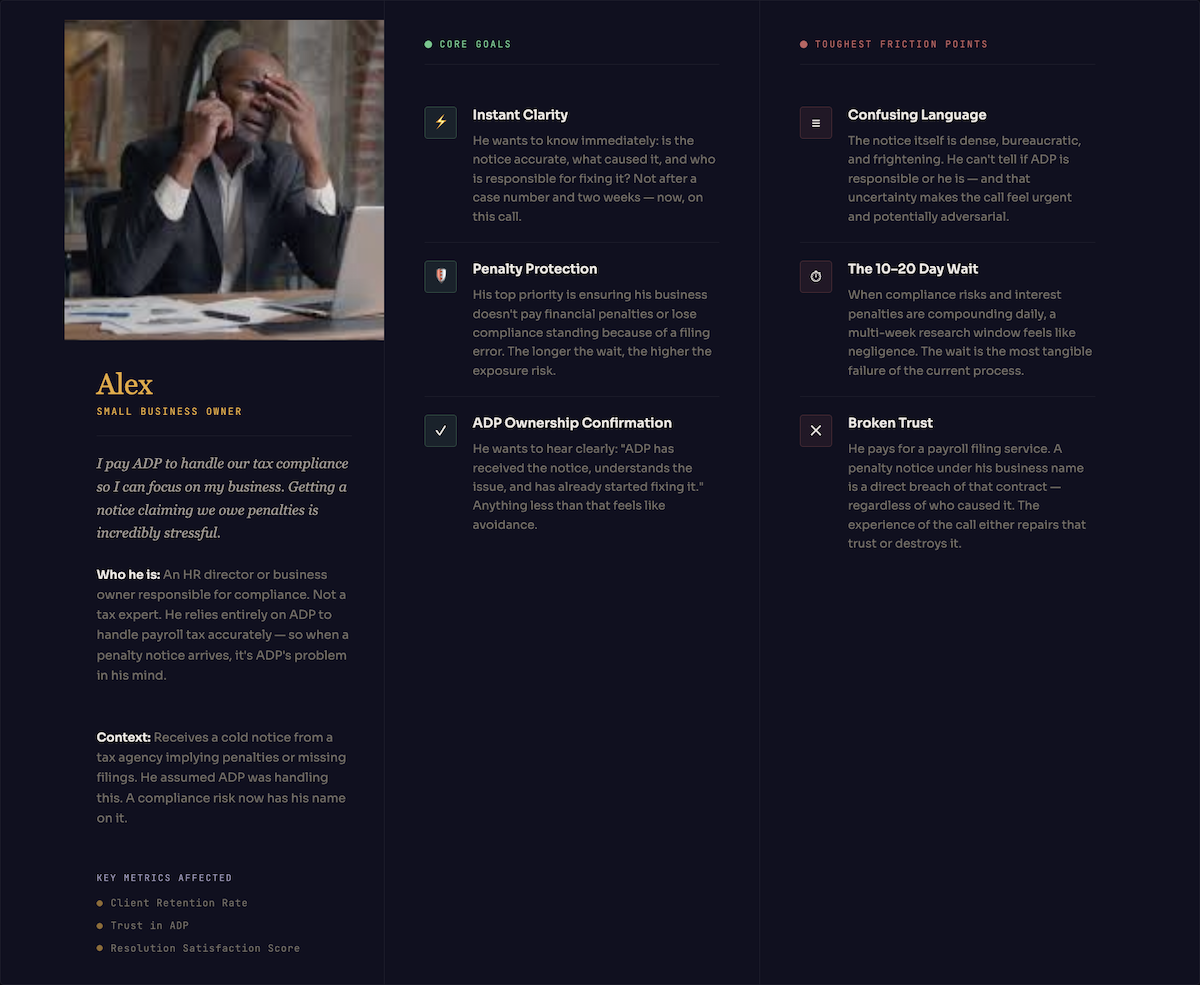
Two associates, same notice, different decisions

The core failure was not a technology gap, it was a decision-support gap. Associates determined ownership, validated details, and choose to escalate or resolve based on training memory and personal judgment. The result was inconsistency at scale.


Research teams were the visible victims: they received cases that were incomplete, invalid, or could have been resolved on the initial call. Each avoidable escalation added 10 to 20 days to a client's wait. For a small business staring at a penalty notice, that delay had real financial consequences.

Problem Statement
"During live, high-stress client calls, service associates lacked a standardized workflow to validate payroll tax notices. This resulted in inconsistent case intake, increased cognitive load that impacted handling times, and avoidable escalations that delayed case resolution to 10–20 days, compounding client anxiety and exposing businesses to costly regulatory penalties."
Artifact : Current Workflow:
MANUAL, JUDGMENT-DEPENDENT TRIAGE PROCESS CLIENT CALLS ADP MANUAL NOTICE INTERPRET MULTI-SYSTEM MANUAL CHECKS VALIDATE DETAILS INCONSISTENT JUDGMENT CALL NO GUARDRAILS PREMATURE ESCALATION INCOMPLETE RESEARCH TEAM REWORKS CASE CLIENT WAIT 10–20 DAYS ⚠ No structured path ⚠ 3 systems, no guide ⚠ Inconsistent outcomes ⚠ Terminology confusion & Fragmented knowladge ⚠ Invalid / incomplete escalations Outcome: Research teams received cases they couldn't act on without rework. Manual Process · No Validation gates · Judgment-dependent escalation decisions Two associates handeling the same notice could reach different outcomes
Before state: Manual, judgment-dependent triage with no structured validation path Discovery Phase · Current State Analysis
01
No Consistent Decision Path
Associates determined ownership, validated details, and choose to escalate based on training recall. The process lived in people's heads, not in the platform.
Operational Inconsistency
02
Premature Escalations
Cases reached research teams before required validation was complete, missing tax IDs, unconfirmed jurisdictions, absent POA documentation. Research teams spent significant time on rework before they could begin actual investigation.
Research Team Burden
03
Fragmented Knowledge
Siloed knowledge forced associates to manually cross-reference multiple disconnected systems to check payroll configurations. Under live call pressure, this operational friction caused severe cognitive overload and a persistent fear of giving incorrect guidance.
High Cognitive Burden
04
10–20 Day Client Delays
Clients holding penalty notices waited weeks, even when some issues could have been clarified on the initial call. The delay wasn't always necessary. It was the system defaulting to escalation because resolution criteria were unclear.
Client Experience Risk
05
No Scalable Framework
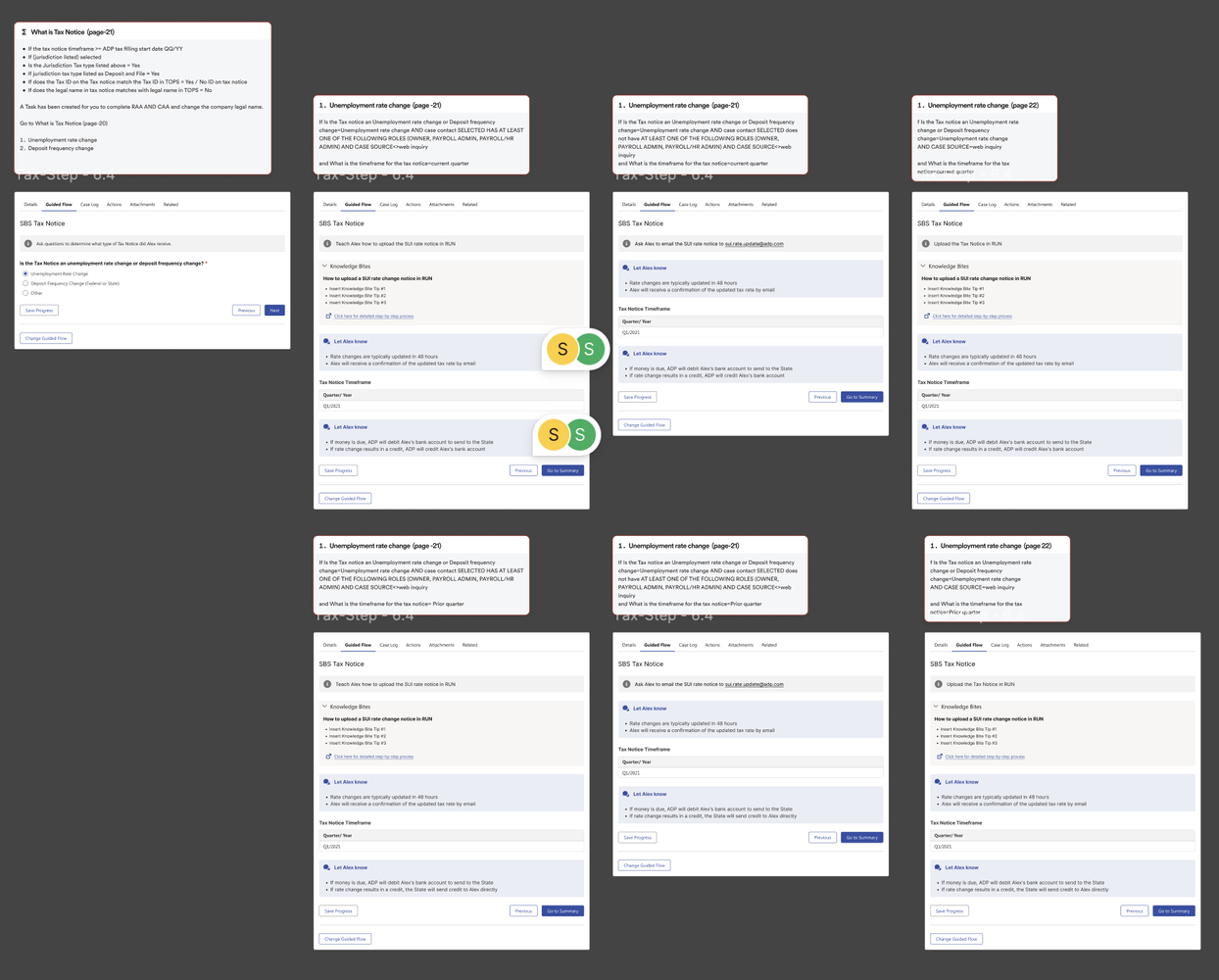
Tax notices, SUI rate changes, and deposit frequency changes each had different handling rules. There was no reusable logic framework, every notice type was a separate institutional knowledge silo.
Scalability Risk
The Downstream Effect
Every incomplete escalation created a chain: rework for research, delays for clients, and eroding associate confidence. The cost wasn't just operational, it was the firm's credibility during a client's most stressful payroll moment.
Strategic Business Risk

03 — My Role & Collaboration

Translating operational complexity into structured interaction

UX Strategist · Service Cloud

I owned the end-to-end UX lifecycle: from researching how associates handled calls and mapping the complex decision logic, to designing a guided flow structure tailored to the technical constraints of Salesforce Flow-Builder.


My specific contributions:


  • Mapped legacy workflows to isolate inconsistent decision points and synthesized stakeholder requirements into a unified, audit-ready flow model.
  • Defined the 8-gate validation framework and branching logic across all notice types
  • Translated internal acronyms into contextual, associate-facing guidance to eliminate ambiguity.
  • Created UX artifacts to align product, operations, Salesforce engineering, and research teams on a shared solution
Collaboration Ecosystem
Product Owner
Defined business goals, prioritization, and platform scope. The bridge between operational need and development roadmap.
Tax Subject Matter Experts
Clarified notice handling rules, jurisdiction setup, POA/TPA requirements, and escalation criteria. Their knowledge became the logic behind the validation gates.
Service Associates / Operations Leads
Provided real call-handling behaviors, edge cases, and the exact moments of uncertainty that the flow needed to address.
Solution Architect & Engineering
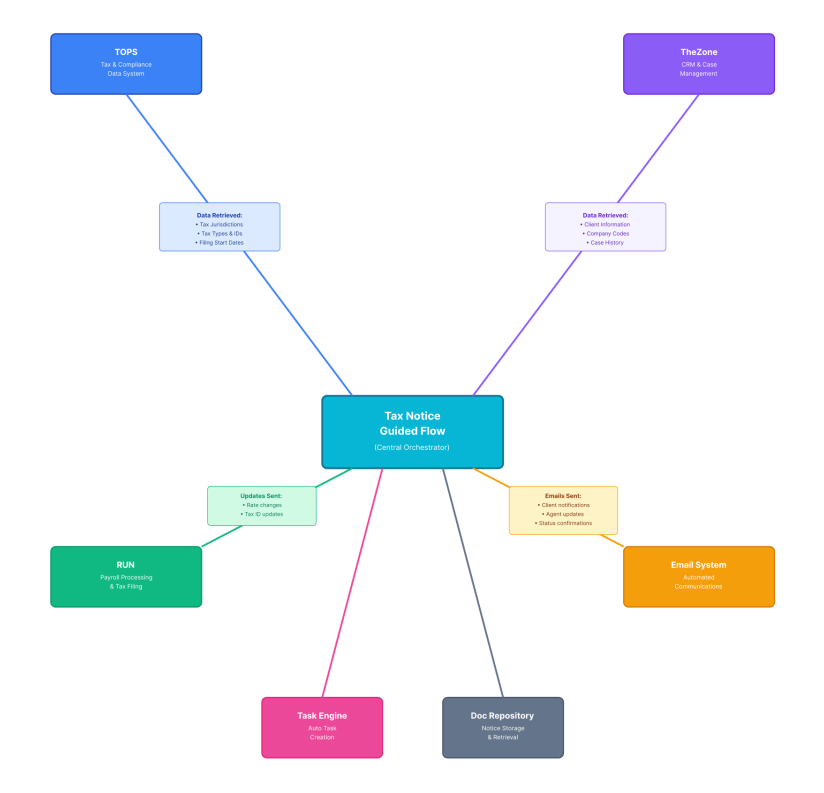
Determined what could be supported inside the platform, how guided logic could connect to case creation and structured CRM data capture.
Business stakeholders - VP Client Service
Defined what a "valid escalation" looks like : the required fields and documentation before a case should reach the research queue.
Tax SMEs and research teams were the most critical voices. The gap between what associates understood and what research teams needed was where the design had the most leverage.

04 — Discovery & Research

Understanding the call in real time

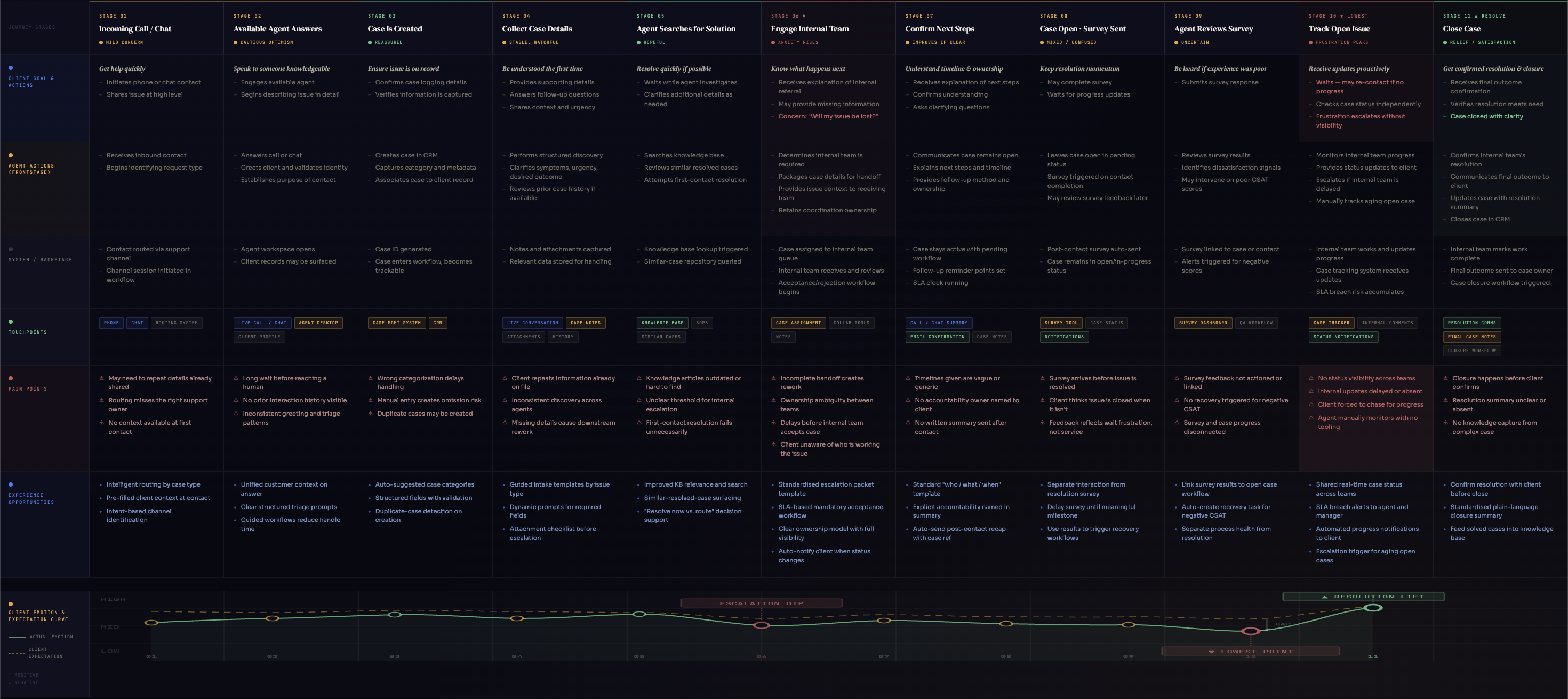
Discovery focused on two things: mapping what associates actually did during tax notice calls, and identifying where the process broke down, not in theory, but in the specific moment of a live client interaction.


Research inputs included associate interview, stakeholder conversations, process documentation, existing workflow diagrams, Salesforce/support case handling patterns, SME walkthroughs, and research team intake requirements. The goal wasn't to document the full policy, it was to find the decision points that caused inconsistency.


The critical insight: most associate uncertainty clustered around the same questions. Is this ADP's period? Is the jurisdiction set up? Does the Tax ID match? Does ADP have authorization? These weren't rare edge cases, they were the standard path, and they had no in-platform support.
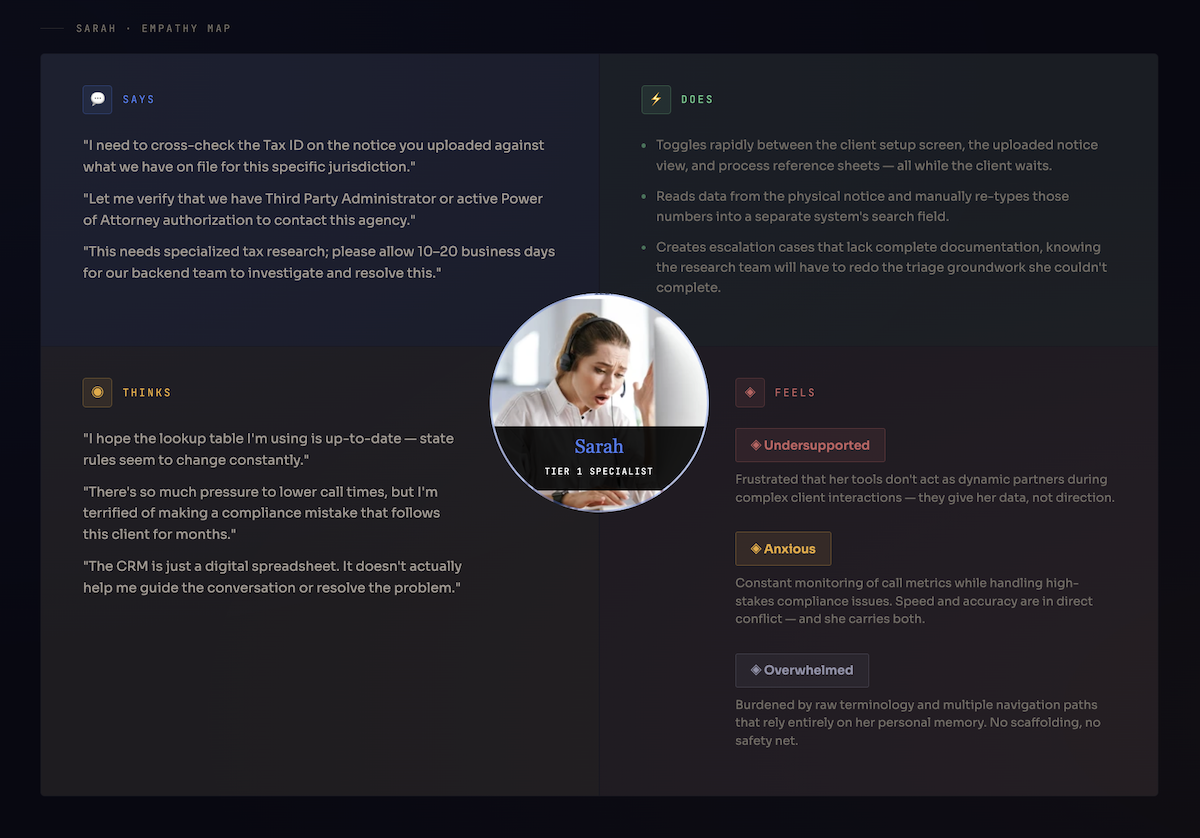
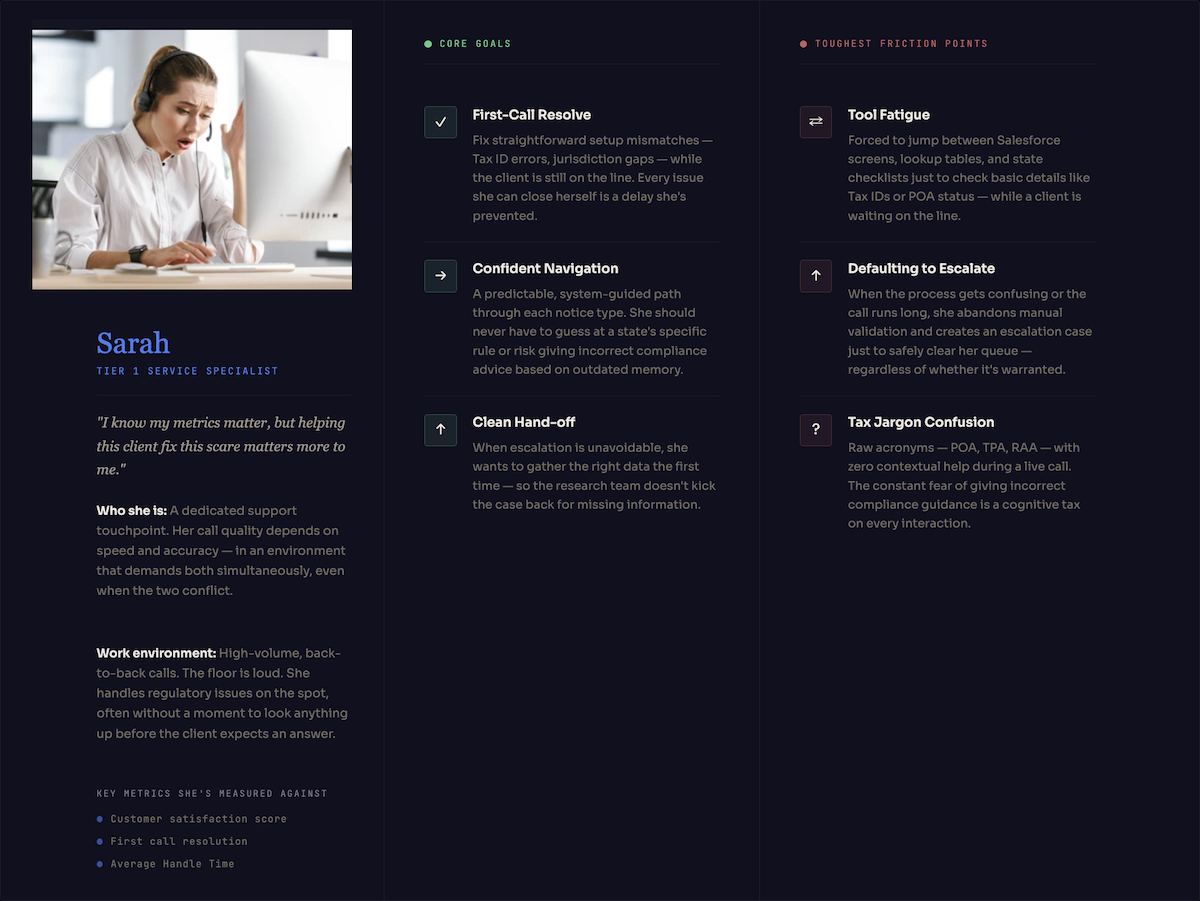
Key Questions That Shaped the Design
Q Which notice types do associates handle most, and where does each one go wrong?
Q What must be validated before a case is valid to escalate?
Q Where do associates currently get stuck, and what do they reach for when they do?
Q What does a "valid escalation" mean for each notice type, from the research team's perspective?
Q Which cases could have been resolved on the first call, and weren't?

05 — Hypothesis & Design Principles

Validation first, escalation second

The central design hypothesis was about sequencing, not simplification. The tax rules themselves didn't need to be hidden, they needed to be revealed in the right order, at the right moment, through the right question.

The guided flow's core value was not speed. It was consistency. An associate who is confident in their decision, because the platform walked them through validation, serves the client better than an associate who is fast but uncertain. That insight shaped every design decision that followed.

Core Hypothesis
"If associates are guided through a structured tax notice validation flow, then they will determine responsibility more consistently, resolve eligible cases during the call, reduce unnecessary escalations, and give clients clearer expectations without requiring associates to memorize every exception or rule."
Associates wanted guidance, not hand-holding
Experienced users needed the flexibility to skip steps or take shortcuts, while new users needed more support.
Context switching killed productivity
Every time users had to leave the flow to check documentation, they lost momentum and increased error rates.
Visual cues beat text explanations
Users responded better to visual indicators and progressive disclosure than lengthy instructions.
Design principles
01
Structured Guidence
Step-by-step flows that reduce cognitive load while maintaining transparency
02
Determine ADP responsibility early
Guide associates through the steps to determine issue responsibility : whether it is ADP-owned, client-owned or agency-owned.
03
Plain Language Over Jargon
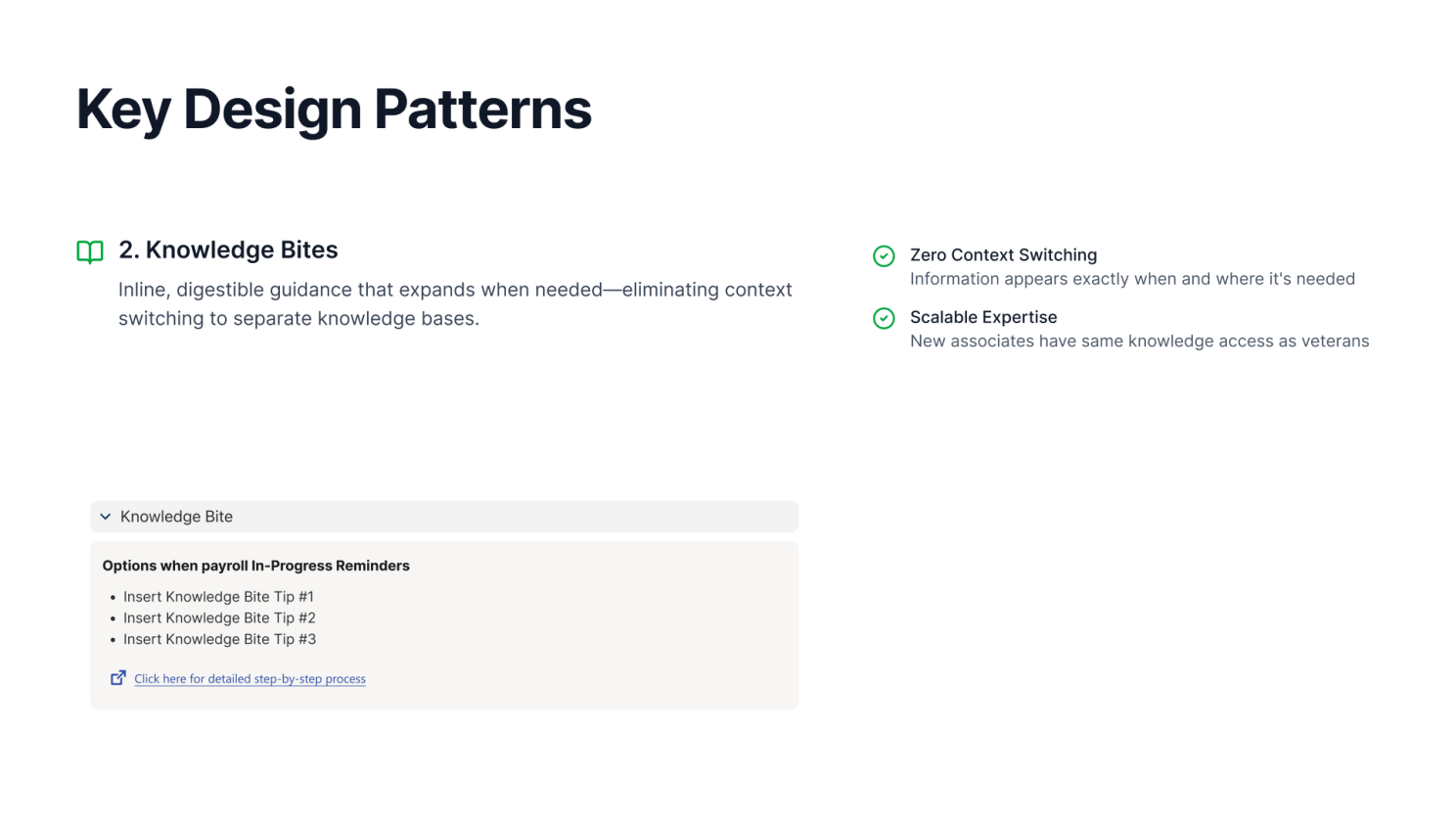
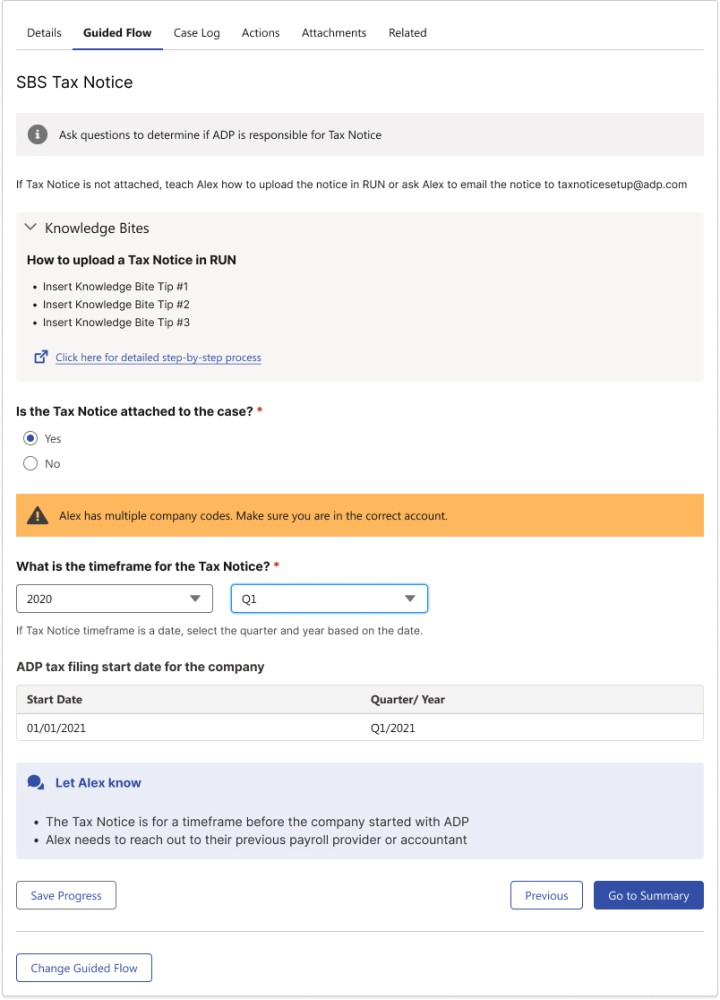
Internal terms are contextualised, not exposed raw. Clear instructions, helper text, and "Knowledge bites" replace acronyms with meaning, without removing the underlying logic.
04
Designed for Live Call Pressure
Short prompts. Clear next steps. Minimal backtracking. No question asks the associate to leave application to find the answer. Every gate is resolvable within the context of the current screen.
05
Capture Once, Reuse Downstream
Information entered during the guided flow populates the Salesforce case object. The associate does not re-enter data. The research team receives a complete record, not a blank intake form.
06
Sequence Complexity, Don't Hide It
Tax notice handling is genuinely complex. The design doesn't oversimplify, it reveals the right complexity at the right time. Associates encounter difficulty when they're ready for it, with context.

06 — The Proposed Solution

Eight gates that changed the routing logic

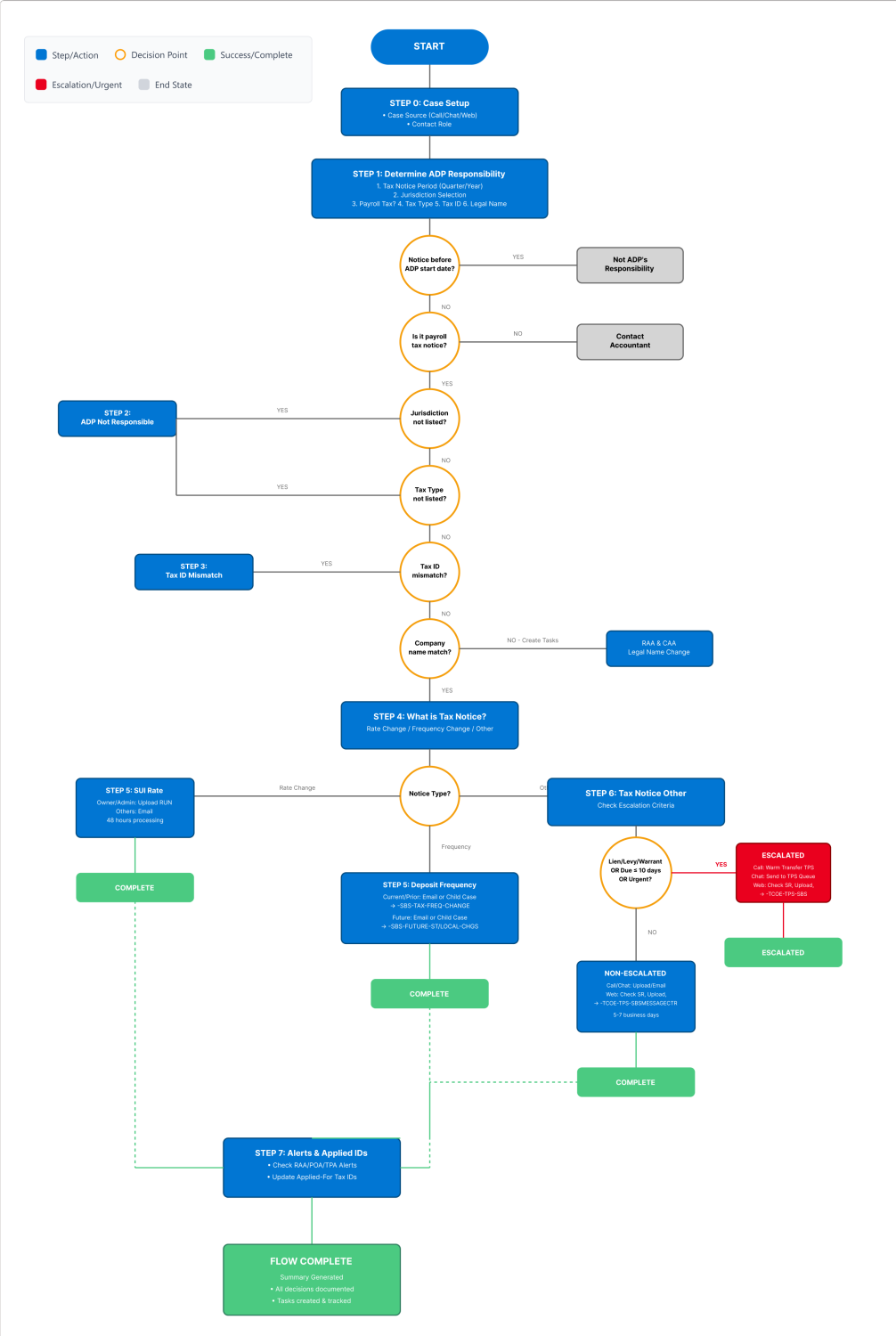
The Tax Notice Guided Flow embedded directly within support platform, no context switching, no separate tool. It guides associates through ownership determination, validation gates, structured notice classification, and either in-call resolution or qualified escalation.

The validation gate framework is the intellectual core of the solution. Each gate asks a specific question that determines whether the case can continue, needs correction, or should stop. The gates are not bureaucratic checkboxes, they are the exact questions that tax SMEs said must be answered before a case is valid to escalate. The design made those questions unavoidable.

Artifact : Core Design: The 8-Gate Validation Framework
GATES RUN IN SEQUENCE · EACH GATE DETERMINES WHETHER THE CASE PROCEEDS, REDIRECTS, OR STOPS PHASE 01 : IDENTITY & AUTHORIZATION PHASE 02 : NOTICE & Routing PHASE 03 : CASE READINESS GATE 01 Determine ADP Responsibility Is the notice period within ADP's responsibility window? Stops: outside ADP period GATE 02 Jurisdiction Is the jurisdiction active and correctly set up in ADP? Stops & route: missing / inactive / mismatch GATE 03 Tax ID Does the Tax ID on the notice match ADP's records? Stops: mismatch → registration check GATE 04 Legal Name Does the legal name on the notice match the client record in ADP? Flags: minor variation / mismatch GATE 05 Notice Type What kind of notice did the client receive? Routes: Tax / SUI / Deposit Freq GATE 06 Authorization Does ADP have valid POA or TPA authorization for this case? Stops: missing / expired → request GATE 07 Open Cases Is there an existing open case, alert, or RAA for this issue? Stops: prevents duplicate cases GATE 08 Escalation Readiness Is the case valid and complete enough to send to research? Only qualified cases reach research ✓ RESOLVE Eligible cases closed during the initial call → REDIRECT Client/agency action required with clear instructions ↑ ESCALATE Qualified cases reach research with complete validation data GATE 8 ENSURES COMPLETE CASE DATA: CLIENT ID · AGENCY · TAX PERIOD · TAX ID · POA STATUS · NOTICE DOCUMENT · ASSOCIATE NOTES
Each gate is a required check before escalation becomes available Core Solution Design · Salesforce service cloud
Key Design Challenges
Implementation Related
System Limitations

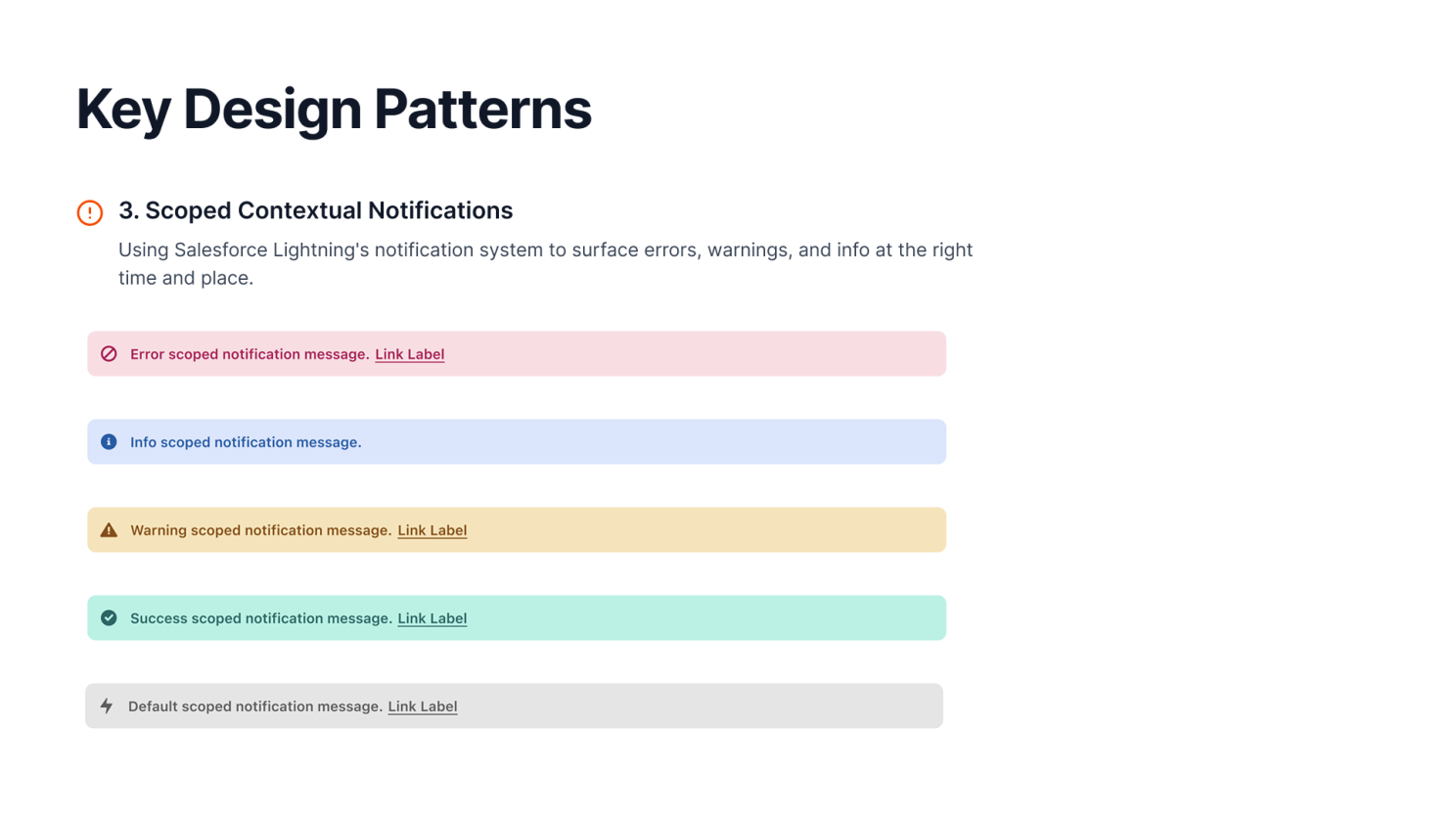
Working within constraints of Salesfore flow-Builder while pushing for modern UX.

Implementation Related
Cross-team Dependencies

Coordinating with multiple teams to align on shared vision and implementation.

Implementation Related
Legacy UX Patterns

The reliance on legacy infrastructure and Salesforce Lightning Web Components (LWC) slowed development, as each new design solution requires custom coding.

User Related
Balancing Guidance with Flexibility

How do we provide guidance without constraining the efficiency of high-performing associates who operate with speed and precision?

User Related
Progressive Disclosure

How much info should we show at each step? Confusion vs. feeling overwhelmed.

User Related
Real-time Decision Support

How can we help associates make quick decisions during calls?
07 — Design Evolution & Concepts Not Pursued

Ideas tested, and good reasons to stop

Each discarded concept revealed something important about the real problem, and pushed the solution toward the validation-gate framework.

Enterprise design constraints are real. The solution had to live inside Service cloud, work with Salesforce case objects, support associates with varying experience levels, and handle compliance-critical decisions without automation risk. That combination ruled out several initially appealing directions.

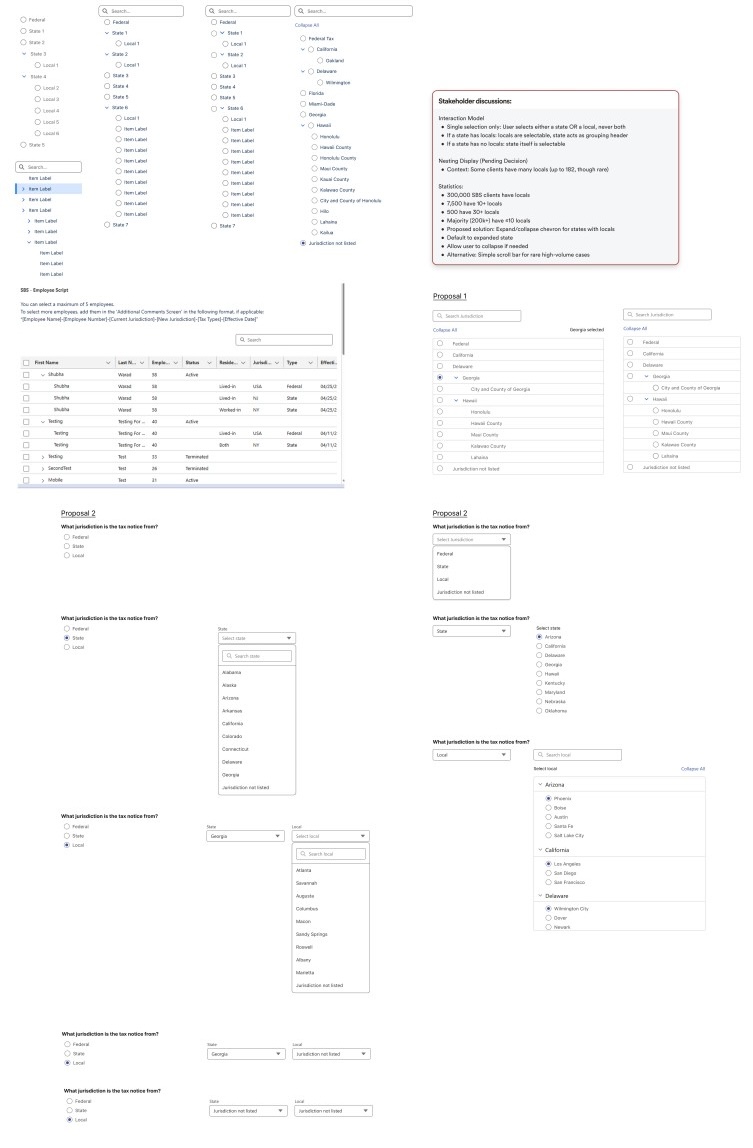
01
Concept Discarded

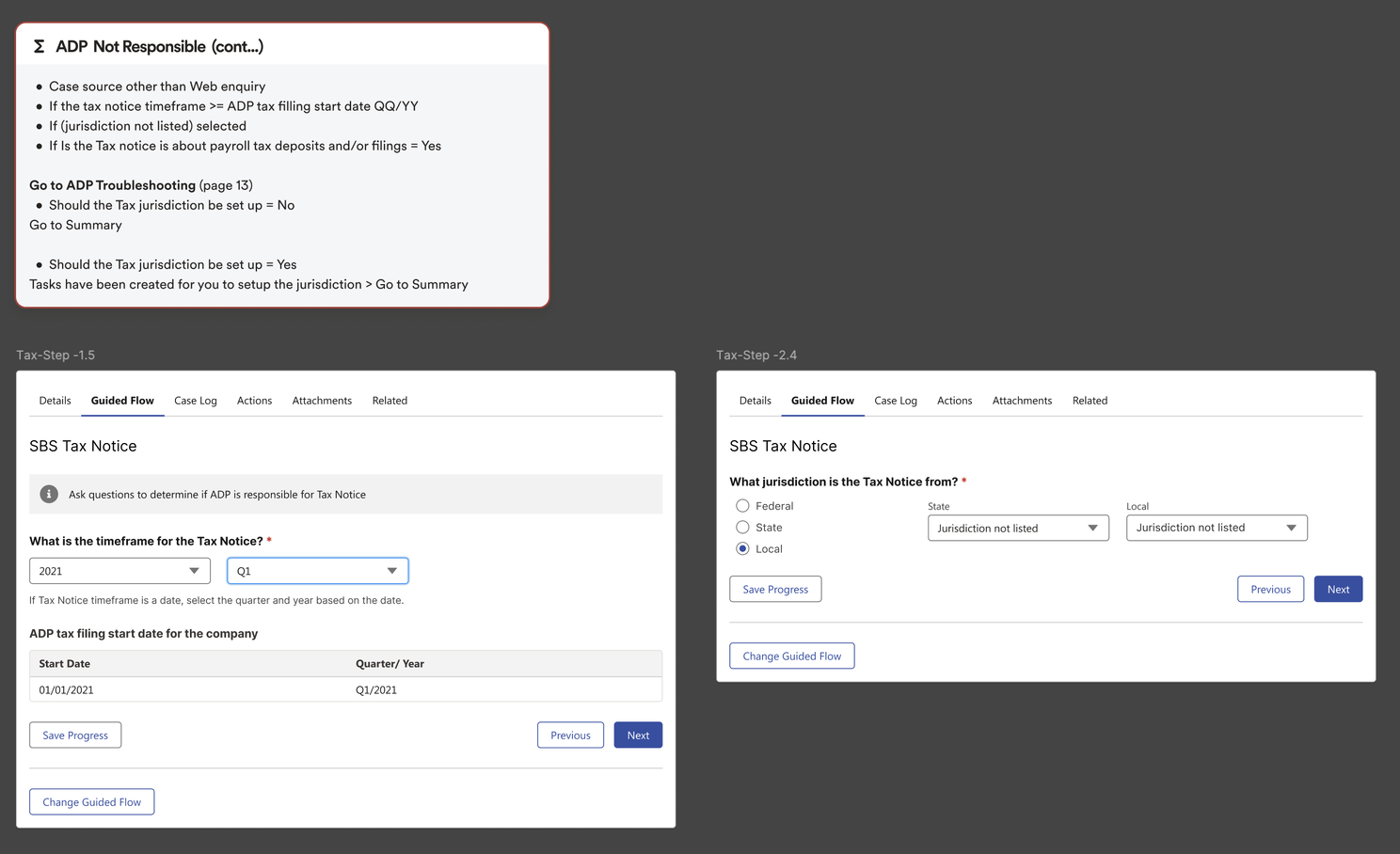
Tree structure Jusrisdiction Selection

Jurisdiction data from state and local agencies is highly unstructured and inconsistently formatted across federal, state, and local levels, making it unreliable.

02
Concept Discarded

Automating the validation of associate input against system records

Business rejected fully automated validation due to high agency-data variability, potential system latency, and the critical need for human-in-the-loop compliance. Incorrect automation poses significant regulatory risks and undermines the transparency required during high-stakes client calls. Instead, we adopted Guided Manual Validation, where the system surfaces contextual data while the associate confirms findings, ensuring each decision is accurate and explainable.

03
Concept Discarded

Modern conversational experience

Prioritized a structured interface to maximize technical feasibility and reduce development costs, as internal tools derive more value from streamlined task completion than stunning interface. Current task-centric design leverages existing associate workflows to ensure familiarity and minimize training time.
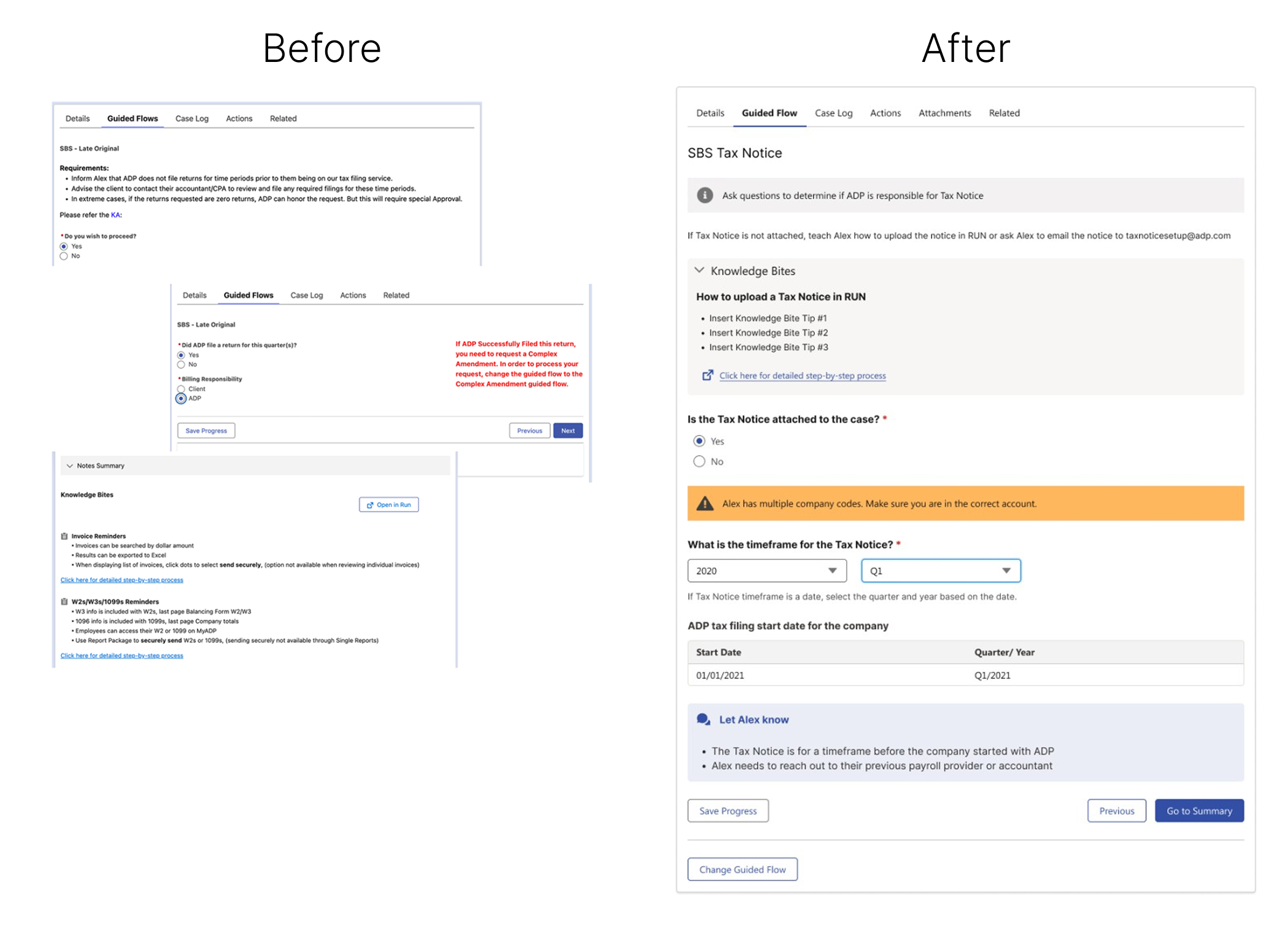
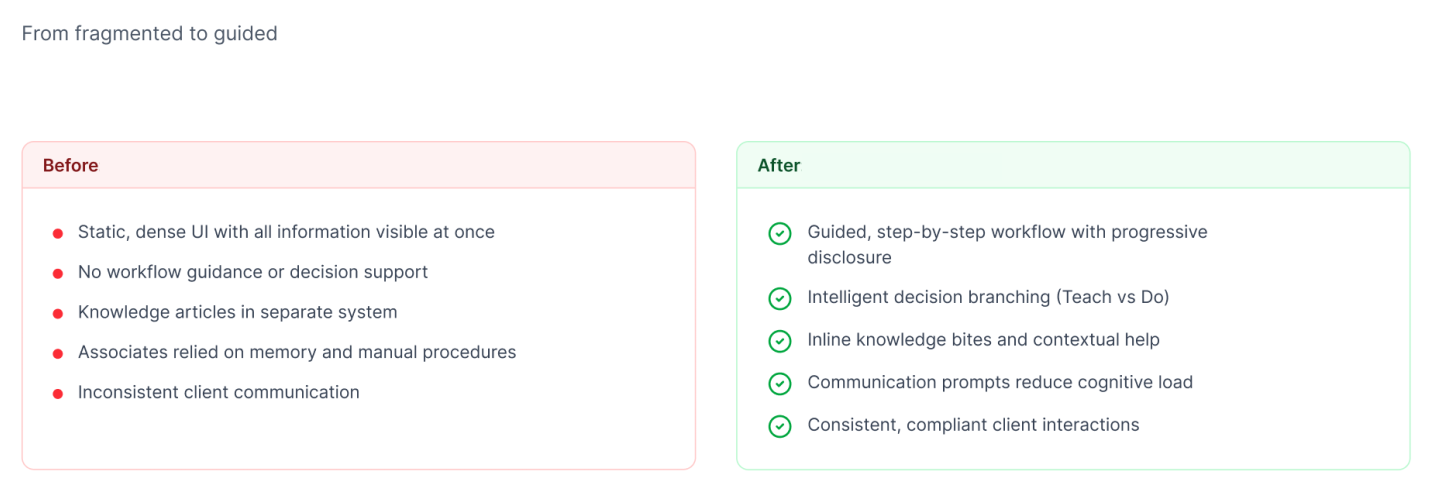
Before & After
Before & After Before & After value
Other Guided Flows Vs Tax Notice Flow
Tax Notice Guided Flow - Prototype

08 — Impact & Outcomes

One flow, three groups better off

The guided flow was not designed for a single user. Every design decision was evaluated against how it would land for associates on the call, clients waiting for answers, and research teams receiving the escalated case.

Associates could tell clients exactly what would happen next, and why. That clarity had compounding value: fewer callbacks, fewer duplicate cases, fewer stalled investigations.

Associates
Clear decision path: knows what question to ask next, at every step
Reduced uncertainty during live client calls under time pressure
Consistent validation outcomes regardless of experience level
Plain-language support for complex terms, no separate lookup needed
Confidence to explain next steps clearly, with system-backed reasoning
Faster onboarding: the flow teaches while it guides
Clients
Faster resolution for cases that could be closed during the initial call
Clear ownership: "ADP handles this" vs. "here's what you need to do"
No unnecessary delays for cases that were being escalated prematurely
More complete case handling : associates collect the right information once
Realistic, specific follow-up expectations, not generic "we'll get back to you"
Reduced callbacks from clients following up on stalled cases
Research Teams
Complete case intake: client ID, agency, jurisdiction, Tax ID, POA status, notice document
Validation summary included : research teams see what was already checked
No invalid cases: premature escalations blocked before they reach the queue
Less time spent requesting missing information from associates before work begins
Focus shifted toward investigation rather than intake correction
Structured escalation reason: clear, consistent basis for every queued case
Target Business Outcomes
↓ 10-20d
Resolution delay targeted for early-closeable cases
↑ FCR
First-contact resolution for eligible notice types
↓ Rework
Research team case rework rate
↑ CSAT
Client satisfaction on tax notice calls

09 — Reflections & Learnings

What this project changed about how I design

01

Guided Workflows are most valuable when the stakes are highest

This project refined a core belief: the time to structure a decision process is before the situation becomes stressful, not after. On a live client call about a penalty notice, an associate's working memory is occupied. The design's job is to hold the process so the associate can hold the conversation. Any interface that requires the user to remember the next step has already failed under pressure.

02

Validation logic is a UX artifact, not just an engineering concern

In enterprise compliance, I learned that information architecture and decision logic - not screen design - are the true frontiers of critical design thinking, where the sequence of validation gates directly dictates operational accuracy and business outcomes.

03

Internal terminology is a workflow problem, not a content problem

Reframing complex terminology as a structural design challenge, rather than a cosmetic one, enabled me to eliminate decision gaps and standardize case outcomes through contextual guidance.

04

Not every decision should be automated - especially not compliance decisions

The temptation to automate ownership determination was real. It would have felt like a more sophisticated solution. But in a compliance workflow, incorrect automation creates risk that no UX polish can recover from. Decision-support structured guidance that combines system data with human judgment, was the right model. The associate remains accountable, but the platform removes the inconsistency. That distinction matters: it protects the client, the associate, and the firm.

05

The best enterprise solutions reduce work for multiple groups simultaneously

A design that helps one group and burdens another is not a solution, it is a redistribution of friction. The validation gate framework served associates, clients, and research teams at the same time. Associates had structure. Clients had faster clarity. Research teams had complete cases. That alignment happened because the design started from a shared definition of what a "valid escalation" meant, not from a single user's perspective, but from the full workflow. That systems thinking is what I carry forward into every enterprise project.

"The UI must do the thinking for them. Our associates shouldn't need to remember steps - the system should guide them through the right sequence every time."
Next case study
Paystub Download & Quick Totals
View case study →